



DaVinci Resolve 17
DaVinci Resolve, the complete solution for editing, visual effects, motion graphics and more, enters the next round.
The biggest improvements of the 17th DaVinci Resolve concern: Colour Correction, Fusion Effects and Editing. Perhaps the most exciting new feature is the ability to use the collaboration functions free of charge. Unfortunately still not available: Native support for ProRes RAW.
Colour Page
As far as Color Page is concerned, a rainbow-coloured fan of features opens up to you.
The high-resolution functions include the HDR tools: With the HDR colour correction palette, you can create your own colour wheel – including the function to adjust the tonal range. Your colour wheel also includes controls for exposure and colour saturation.
Also nice to have: the colour warper. The mesh-based warping tool allows you to adjust two colour parameters at the same time. Hue, saturation, chroma value or lumen are waiting for you to adjust them.
Less colourful, but in the style of our masked times: target grading with Magic Mask. Who will be masked with it? Don’t worry, not you, just your project. DaVinci’s Neural Engine helps you to select and track people or objects from your moving image material – with a mask. You can also select only details of a person (e.g. arms, legs, feet) or an object.
Colour management offers you a wider range of design options. These include New input and output for tone mapping. And also: tools that take your colour space into account and greatly improved image quality.

Be dazzled by the new diagonal blinds. Because it’s among the new wipe modes. Also included: wipes in a chequerboard pattern for greater clarity when comparing image material. Not too far behind at the start: a new split-screen function with which you can compare up to four playheads on your timeline. A function that comes in handy as soon as you compare several clips with each other – or several frames within the same clip.

Cut Page
You know the situation: you have a gigantic audio track – and you’re at a loss as to where your dialogue passages with the actors begin and where they end. Luckily, Trim Against Audio Waveforms now makes this little task easier. When you click on the Audio Trim button, the audio waveforms are displayed in the lower part of the timeline. This makes finding the start and end points of your dialogue much quicker.
Good news for social media fanatics: You can edit your film material in 16:9 HD or Ultra HD in horizontal or vertical format. Ideal for publishing on Instagram and similar platforms. And DaVinci’s Neural Engine comes into play again, as it automatically recognises human faces in your recorded material.
Do you want to analyse your footage down to the metadata? Then you should take a look at the new Clip Inspector. It allows you to select any audio or video settings, whether metadata or RAW image control. You can quickly switch between the various settings groups using tabs. Or you can get creative and animate your settings using the Diamond Keyframe buttons.
Edit Page
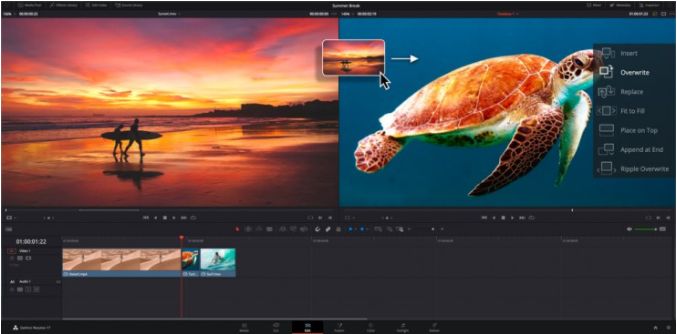
Are you used to a fast-paced lifestyle and are you used to simultaneity? Then you’ll be pleased to know that synchronising multicam clips is now faster. What does this look like in practice? Stack clips on top of each other – and select the new Auto Align tool. Auto Align automatically aligns your clips based on the timecode and waveform of your project. Of course, you can also adjust the clips manually if you wish.
Editing rendered files without having to render them again first? Utopian or feasible? With DaVinci 17 this is – as advertised – working practice. Render in Place is the name of the game.
Nice, but what else is there? For example this: with Scene Cut Detection, DaVinci’s Neural Engine comes into play again – an old acquaintance by now. First you select the Scene Cut analysis, either in Cut or Edit Pages. The Neural Engine then finds the cut points for you – and makes these automatically in the material. This is particularly useful if you want to continue editing your material but have lost the source file.
Fusion Page
You can find the power of 27 new, GPU-accelerated Resolve FXs on the Fusion Page. This includes: Noise reduction, motion blur, light & colour effects, an image restoration tool and more.
Want to add effects to your clips on the Edit & Cut pages? Then what are you waiting for? The templates in DaVinci 17 are customisable – according to your wishes. The steps: build your desired arrangement, save it as a macro, specify the parameters you want to make visible – and save.
If the Fusion Page has left you cold so far, then perhaps you’ ll warm to the new automatic timing of animations. What you do: Stretch or squeeze keyframes; add bounce, mirror or loop animations. What DaVinci does for you now: adjust the duration of the keyframes and animations, depending on how long – or short – you want the duration of the entire clip to be.

Collaboration
Blackmagic is now making collaborative working available free of charge. This should make it easier for geographically dispersed remote offices to work together. And yes, we know that DaVinci originally refers to collaboration. However, due to dark chapters in German history, we prefer to speak of co-operation. For your collaboration, that doesn’t matter. Collaboration, cooperation, collaboration – from a practical working point of view, it’s all the same, isn’t it?
Blackmagic Hardware
A quick digression: Blackmagic’s passion for publishing doesn’t stop at DaVinci software, because two hardware releases are demanding your attention: the Fairlight Desktop Console and the Resolve Speed Editor Console.
Availability & everything else
On DaVinci’s homepage you can read what we have kept from you: Fairlight Page and the new features. Or you can join the public beta at Blackmagic. For Blackmagic’s feature-length product presentation, start at minute 28:10 in the video below. Or you can take a look at our colleagues at Ripple Training. Their first video is dedicated to Colour Page, the second to the new features around Edit Page.
Introducing DaVinci Resolve 17
DaVinci Resolve 17 – Colour Page New Features
DaVinci Resolve 17 – Edit Page New Features
